
How to Choose the Best 3D Skin Scanner in 2026

Choosing a 3D Skin Scanner in 2026 is not simply a matter of comparing resolution or counting features. A useful system should capture repeatable images, show changes clearly, and fit the pace of a real clinic. Look closely at how it handles uneven lighting, facial contours, and different skin tones. Ask to see the same person scanned twice under ordinary working conditions. Small inconsistencies matter.

Aesthetic-medicine expert Dr. Steven Dayan offers a practical principle: “Choose the scanner that makes change measurable, not merely visible.” Treat that as a buying lens, not a substitute for clinical evidence. Check what the software actually measures, how results are explained, and whether staff can use the system without slowing consultations. A polished screen can impress. It can also distract.

This guide compares the details that shape a sound purchase: imaging quality, analysis tools, workflow, training, support, and total cost. It also considers a less tidy reality: no scanner tells the whole story of someone’s skin. Lighting, hydration, and positioning can affect what appears on screen. That deserves attention. Ask vendors about validation, repeatability, data handling, and limitations before deciding. Then judge the device against your clinic’s needs, not its longest feature list.
How to Choose the Best 3D Skin Scanner in 2026

What a 3D Skin Scanner Measures and How It Works

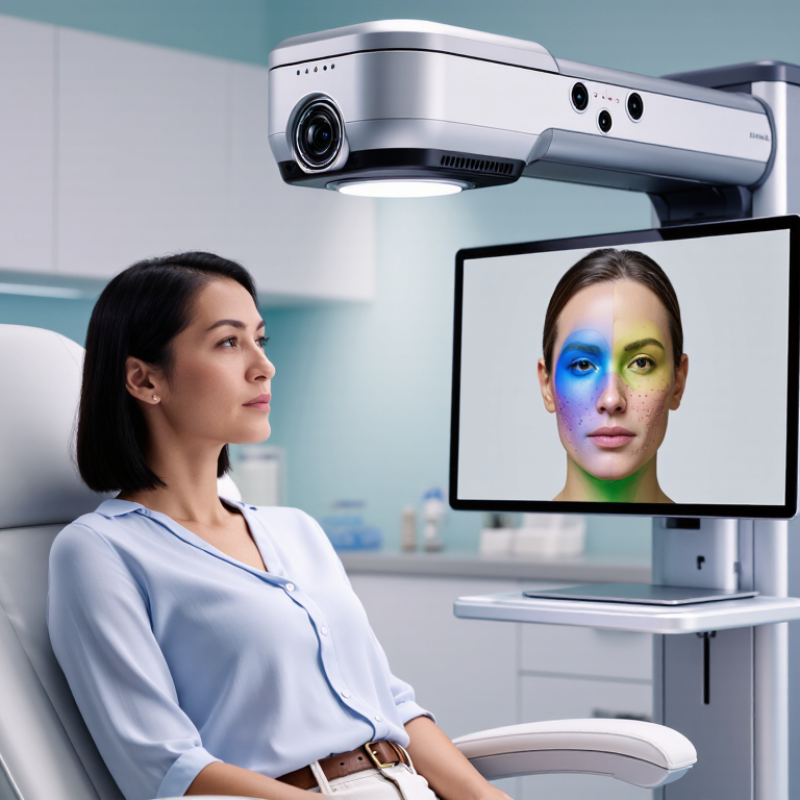
A 3D skin scanner uses cameras, structured light, or depth sensors to build a digital surface map of the face. Depending on the system, it may estimate wrinkles, pores, pigmentation, redness, texture, and facial volume. It records visible patterns, not the full biology beneath the skin. Light matters. Shadows, makeup, facial movement, and a damp or shiny surface can change readings. Even a small change in camera distance may affect comparisons.

During a scan, the person usually sits still while several images are captured from different angles. Software aligns those images, creates a three-dimensional model, and calculates measures from selected areas. Results may appear as color maps, scores, or side-by-side images that help track change over time. Consistent lighting, pose, distance, and skin preparation make repeat scans more useful. Still, a score is not a diagnosis. Some outputs look more precise than the underlying measurement warrants; treat them as clues, not facts.

When reviewing a scanner, ask what each metric means, how it was validated, and what its limits are. Different devices may use different methods, so their numbers are not always directly comparable. A useful scan should make its measurement process clear and produce repeatable results under similar conditions. If a reading changes sharply, check the setup before assuming your skin has changed.

Which Skin Assessment Needs the Scanner Must Meet

Choose a 3D skin scanner around the assessments you actually perform. For texture, fine lines, and pore appearance, check that images show consistent detail across the cheeks, forehead, and nose. For pigmentation or redness, confirm the scanner captures those features reliably under controlled lighting. A clear image is not automatically a useful measurement.

Ask how the device handles repeat scans, different skin tones, and changes in room lighting. A client should be positioned the same way each visit, with hair pulled back and the face free of makeup when practical. Small differences count. Look for documented testing, calibration guidance, and clear explanations of what each score means. If the scanner tracks progress, results should be comparable over time, not just visually impressive on screen. Also check whether the software protects client images and allows appropriate access controls. These tools support observation; they do not replace a qualified clinical assessment or diagnose disease.

I would be cautious about any system that promises certainty from a single scan. That is a real limitation.

How to Compare Imaging Methods and Measurement Features

How to Choose the Best 3D Skin Scanner in 2026

How to Compare Imaging Methods and Measurement Features

Compare what each method actually measures. Standardized photography records visible color and surface appearance; cross-polarized or multispectral imaging can help separate redness and pigmentation. 3D stereophotogrammetry maps surface shape, making it useful for tracking pores, fine lines, and texture changes. These outputs are not interchangeable. A polished image can still hide inconsistent capture conditions.

For deeper detail, dermatology imaging reviews report that optical coherence tomography can image roughly 1–2 mm into skin, with axial resolution commonly around 5–15 μm. Reflectance confocal microscopy can resolve finer cellular detail, but usually reaches only a few hundred micrometers. These are typical ranges, not guarantees; performance varies by instrument and settings. Check repeatability, color calibration, spatial resolution, and whether the software reports the same regions across visits. It is tempting to trust a detailed dashboard. Repeatability deserves more attention.

Tips: Capture the same cheek area, at the same distance and lighting, each time. Ask for repeat-scan results, not just sample images. Check whether measurements are exported with units and timestamps. If a feature has no clear validation method, treat its score cautiously.

How to Evaluate Accuracy, Usability, Privacy, and Cost

How to Choose the Best 3D Skin Scanner in 2026
How to Evaluate Accuracy, Usability, Privacy, and Cost

Accuracy is more than a sharp-looking surface map. Ask for repeatability results, calibration details, and performance across skin tones, ages, and lighting conditions. Scan the same person several times, then compare whether small changes remain visible. Small differences matter. A score can look precise while hiding measurement variation. The ISIC 2020 challenge dataset included 33,126 dermoscopic images, but it was not a 3D scanner benchmark. Its scale is a reminder: test claims need evidence from varied data, not a polished demonstration alone.

Usability shows up on an ordinary workday. Watch a new operator set up the device, scan a face, and review the output without coaching. Note capture time, retakes, cleaning steps, and whether results fit existing records. A cumbersome workflow can undermine otherwise strong measurements. It happens. Request an evaluation using realistic room lighting and typical appointment schedules, rather than ideal conditions.

For privacy, check what images and measurements are stored, who can access them, and how deletion works. The 2024 Cost of a Data Breach Report put the average healthcare breach cost at $9.77 million. That figure is not a scanner-specific risk estimate, but it makes data safeguards a practical purchasing concern. Compare full ownership costs: purchase, training, calibration, maintenance, software, and eventual replacement. A lower price may not stay lower. Ask for written service terms and a clear estimate of recurring fees.

How to Choose the Best 3D Skin Scanner in 2026

Sample decision weights for comparing accuracy, usability, privacy, and total cost. These are a customizable evaluation rubric, not market averages or measured product results.

Prioritize accuracy by checking repeatability against a consistent reference method. Assess usability in the intended workflow, review data storage and access controls, and compare total ownership costs such as hardware, software, training, and maintenance.

How to Check Evidence, Support, and System Compatibility

Choosing the best 3D skin scanner in 2026 means looking beyond polished demonstrations. Ask for evidence that scanning results are repeatable under ordinary clinic conditions. Useful documentation describes the testing method, lighting, operator training, and range of skin tones represented. A single impressive image proves little. Compare repeated scans of the same area, and check whether small changes reflect measurement noise or real differences. Independent evaluations are more persuasive than sales claims, though they may not answer every practical question.

Support matters after installation. Confirm who provides training, how calibration is handled, and how quickly technical issues receive attention. Request a live demonstration using a real workflow, from image capture to report export. Check whether the system works with your existing computer, operating system, and clinical software. Ask about supported file formats and data transfer methods before purchase. Compatibility can sound dull, but a scanner that cannot share files smoothly may create extra steps every day. I would also test the workflow with staff who will use it; specifications alone can miss awkward details.

Tips: Request raw scan files. Ask to see repeatability results, not just sample images. Confirm support response times in writing. Test one complete workflow before committing, and note any unclear answers for follow-up.

How to Choose the Best 3D Skin Scanner in 2026 — How to Check Evidence, Support, and System Compatibility

Use this vendor-neutral scorecard to compare 3D skin-scanning systems. The suggested weights total 100%; adjust them to match your clinical, research, or business use. Verify claims against written documentation and a hands-on evaluation.

3D Skin Scanner Evaluation Scorecard
Evaluation dimension Suggested weight What to check Evidence to request or test Warning signs
Independent evidence 20% Whether performance claims are supported for the intended users, population, skin concerns, and scanning conditions. Ask for peer-reviewed studies or independent evaluations. Check the study methods, sample, outcomes, limitations, and whether the tested system matches the offered configuration. Marketing images or testimonials presented as proof; results with no methods, sample details, or stated limitations.
Measurement validity 15% Whether each displayed measurement or score has a clear definition and evidence that it measures what it claims to measure. Request the measurement definitions, validation methods, reference standards, and intended-use documentation. Confirm which outputs are measurements, estimates, or visualizations. Unexplained scores, unsupported diagnostic claims, or claims that a scan alone determines a medical diagnosis.
Repeatability and capture conditions 10% Whether repeated scans produce sufficiently consistent results when the person and capture conditions are unchanged. Review repeatability data and the recommended protocol for lighting, positioning, distance, facial expression, preparation, and rescan timing. Test repeat scans in a controlled setup. No documented capture protocol; unexplained changes between repeat scans; results that depend heavily on uncontrolled lighting or positioning.
System compatibility 15% Fit with the organization’s computers, operating systems, network, user accounts, and existing clinical or business software. Obtain written minimum and recommended hardware requirements, supported operating systems and versions, network requirements, and integration specifications. Test the intended configuration before purchase. Compatibility described only as “works with most systems”; unclear update requirements; integrations promised without documented scope or testing.
Workflow and data portability 10% How scans are captured, reviewed, compared over time, exported, and associated with the correct person or record. Demonstrate the complete workflow using representative cases. Confirm available export formats, image and report access, account roles, and what happens to data if the service ends. Data can be viewed only inside the system; export limits or fees are unclear; manual steps increase the risk of record mix-ups.
Privacy and security 10% How identifiable images and related personal data are collected, stored, accessed, transferred, retained, and deleted. Review the privacy notice, data-processing terms, access controls, retention and deletion options, backup practices, and security documentation. Check applicable local privacy requirements. Unclear data ownership or retention; no defined deletion process; vague answers about access, sharing, or storage location.
Training and ongoing support 10% Availability of onboarding, troubleshooting, software updates, maintenance, and support for the expected operating hours. Request training materials, support hours and channels, escalation procedures, maintenance terms, update policy, and service response commitments in writing. Support scope is verbal only; unclear responsibility for repairs or updates; no plan for staff turnover or system downtime.
Total cost and operating requirements 5% Full cost over the expected period of use, including setup, subscriptions, training, maintenance, and any required hardware. Request an itemized quotation and renewal terms. Confirm what is included, what incurs additional charges, and whether a stable internet connection or other ongoing resources are needed. Unspecified recurring charges; unclear renewal or cancellation terms; essential functions excluded from the quoted package.
Ease of use and accessibility 5% Whether intended staff can operate the system consistently and whether the setup accommodates the people being scanned. Have representative staff complete the standard workflow after training. Assess instructions, physical setup, positioning options, and how the system handles users who cannot follow standard posing directions. Only a specialist can operate routine scans; no clear instructions for atypical positioning or accessibility needs.
Total suggested weight 100% Score each dimension using the same scale—for example, 1 (poor or unverified) to 5 (strongly documented and demonstrated)—then apply the chosen weights.

Decision tip: Before committing, run a representative workflow trial and confirm key claims, compatibility, data handling, support terms, and total costs in writing. Requirements vary by intended use and jurisdiction; check applicable regulations and professional guidance.

Back To Top